Let me ask you something. How much time do you spend creating content each week? Writing blog posts, recording videos, designing graphics, drafting emails—it's endless.
If you're like most digital marketing professionals, the answer is: "Too much time, and I still can't keep up." Content creation is exhausting. You're constantly creating new content, but it feels like you're always behind.
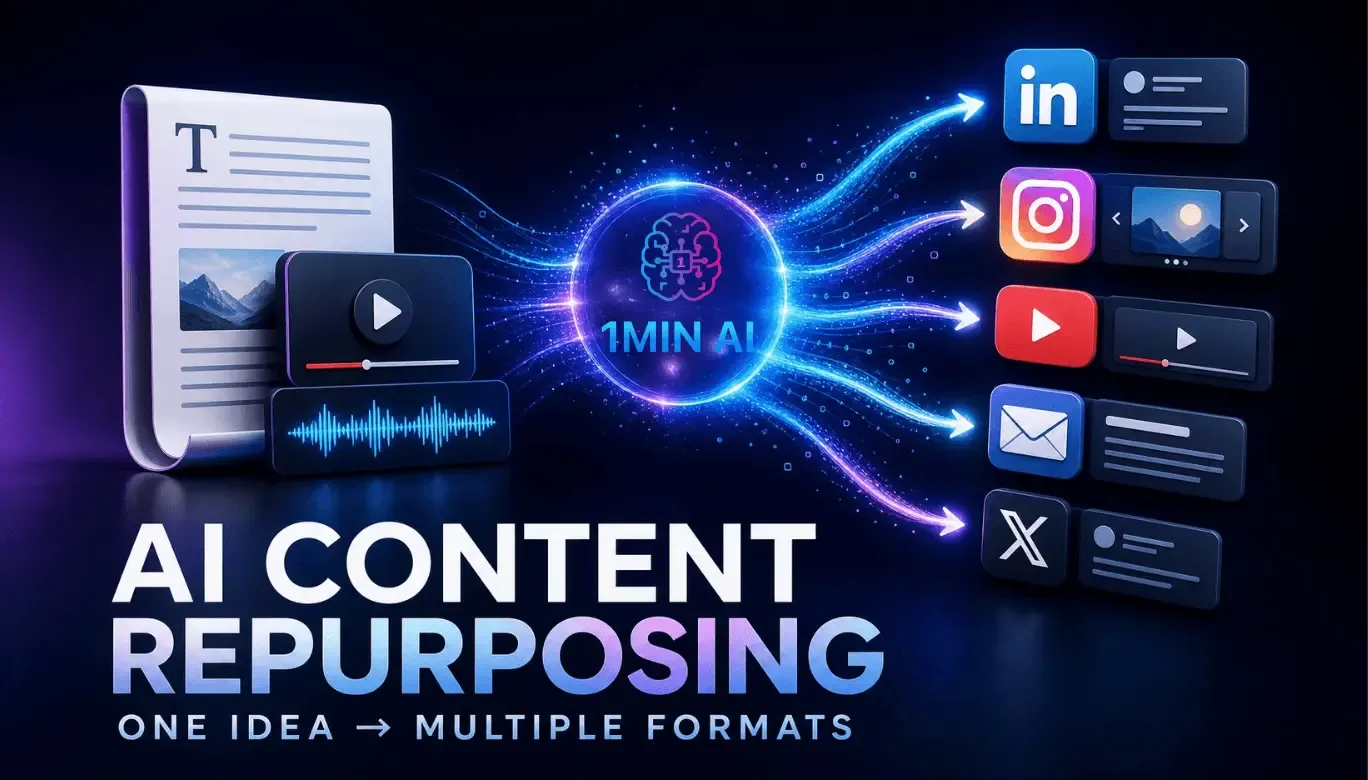
Here's the good news: You don't need to create more content. You need to repurpose what you already have. With AI, you can turn one piece of content into 50+ posts across every platform. In this guide, I'll show you exactly how to use AI-powered content repurposing to multiply your content output—without multiplying your workload.
Whether you're a digital marketing professional, a business owner, or a student taking a digital marketing course, this is your blueprint for content efficiency.
Let's dive in.
1. Why Content Repurposing Is Essential
Content repurposing is the smartest way to scale your content without burning out.
1.1 The Content Creation Trap
- You spend hours creating content
- You publish it once and move on
- Most of your audience never sees it
- You start from scratch every time
This is exhausting and inefficient. You're creating content that only gets seen once—by a fraction of your audience.
1.2 The Repurposing Advantage
- More reach: Different people use different platforms
- Less work: Create once, publish everywhere
- Better results: Content that performs well can be repurposed for even more success
- Consistency: You can maintain a consistent presence without constant creation
1.3 The AI Multiplier
AI makes repurposing effortless. It can transform one piece of content into dozens of variations—in minutes. What used to take hours now takes seconds.
2. What AI Repurposing Can Do
Here's what AI can do with a single piece of content.
2.1 From One Blog Post
- 5-10 social media posts
- 1 email newsletter
- 1 video script
- 1 podcast episode outline
- 5-10 short video scripts
- 1 infographic
- 1 LinkedIn article
- 5-10 tweets or threads
- 1 slide deck
- 1 carousel post
2.2 From One Video
- 5-10 short clips
- 1 blog post transcript
- 5-10 quote graphics
- 1 podcast episode
- 5-10 social posts
- 1 email newsletter
2.3 From One Podcast Episode
- 1 blog post
- 5-10 audiograms
- 1 YouTube video
- 5-10 social posts
- 1 email newsletter
- 1 quote graphic
3. The AI Content Repurposing Workflow
Here's a step-by-step process for repurposing content with AI.
Step 1: Create One High-Quality Piece of Content
Start with a single, high-quality piece of content. This could be a blog post, video, or podcast episode. The better the original, the better the repurposed content.
Step 2: Use AI to Extract Key Points
AI Prompt: "Extract the 10 most important points from this content. For each point, provide a headline, key takeaway, and supporting detail."
Step 3: Use AI to Generate Social Posts
AI Prompt: "Create 10 social media posts from these key points. Include variations for LinkedIn, Instagram, and Twitter. Use engaging hooks, questions, and calls to action."
Step 4: Use AI to Create Email Newsletters
AI Prompt: "Write an email newsletter based on this content. Include a compelling subject line, a brief summary, key takeaways, and a call to action."
Step 5: Use AI to Write Video Scripts
AI Prompt: "Create 5 short video scripts (30-60 seconds each) from these key points. Include hooks, main content, and calls to action."
Step 6: Use AI to Generate Visual Content Ideas
AI Prompt: "Suggest 5 visual content ideas based on this content. Include descriptions for infographics, carousels, and quote graphics."
Step 7: Use AI to Repurpose Across Platforms
AI Prompt: "Adapt this content for LinkedIn, Twitter, Instagram, Facebook, TikTok, and YouTube. Use platform-specific best practices."
Step 8: Review, Personalize, and Publish
Always review AI-generated content. Add your unique voice, insights, and personality. Then schedule and publish across your platforms.
4. The Best AI Tools for Content Repurposing
Here are the essential AI tools for content repurposing.
- ChatGPT: Extract key points, write social posts, emails, and scripts
- Opus Clip: Automatically create short video clips from long-form content
- Descript: Edit audio and video, create clips, and generate transcripts
- Canva AI: Create visuals, carousels, and infographics
- Buffer: Schedule and publish across social platforms
- Lately: AI that turns long-form content into social posts
5. Real-World Example: The Repurposing Transformation
Here's how a digital marketing professional used AI repurposing to multiply their output:
- Challenge: They spent 10 hours per week creating content and still couldn't maintain consistency.
- Solution: They created one in-depth blog post weekly and used AI to repurpose it into 50+ pieces of content.
- Result: Their content output increased by 500%. Their engagement grew by 300%. They now spend only 5 hours per week on content—and get better results.
6. Conclusion: Create Once, Publish Everywhere
Content repurposing is the smartest way to scale your content without burning out. With AI, you can turn one piece of content into 50+ posts—in minutes. You reach more people, on more platforms, with less work.
But here's the good news: You can start today. Take one piece of content you've already created. Use AI to repurpose it. You'll be amazed at how much content one blog post, video, or podcast episode can become.
The choice is yours. Keep creating from scratch, or start repurposing with AI.
Join the best Digital Marketing Course to master AI-powered content creation and digital marketing in 2026.
Frequently Asked Questions (5 Unique FAQs)
❓ 1. How many pieces of content can I create from one blog post?
With AI, you can create 30-50+ pieces of content from one blog post. This includes social posts, email newsletters, video scripts, infographics, and more. AI makes it fast and easy.
❓ 2. Does repurposed content hurt SEO?
No—as long as you adapt it for each platform and avoid duplicate content. Each piece should be tailored to the platform and audience. Repurposing is a standard, effective marketing practice.
❓ 3. Will my audience get tired of seeing the same content?
Not if you repurpose strategically. Most of your audience doesn't see every piece of content you publish. And when you adapt content for different platforms, it feels fresh to each audience.
❓ 4. How much time does AI repurposing save?
Most marketers report saving 10+ hours per week using AI for content repurposing. You can create 50 pieces of content in the time it used to take to create 5.
❓ 5. What's the biggest mistake in content repurposing?
Publishing identical content across platforms. Each platform has its own culture, format, and audience expectations. Adapt your content for each platform rather than posting the same thing everywhere.